|
Auto Photo Organizer
|
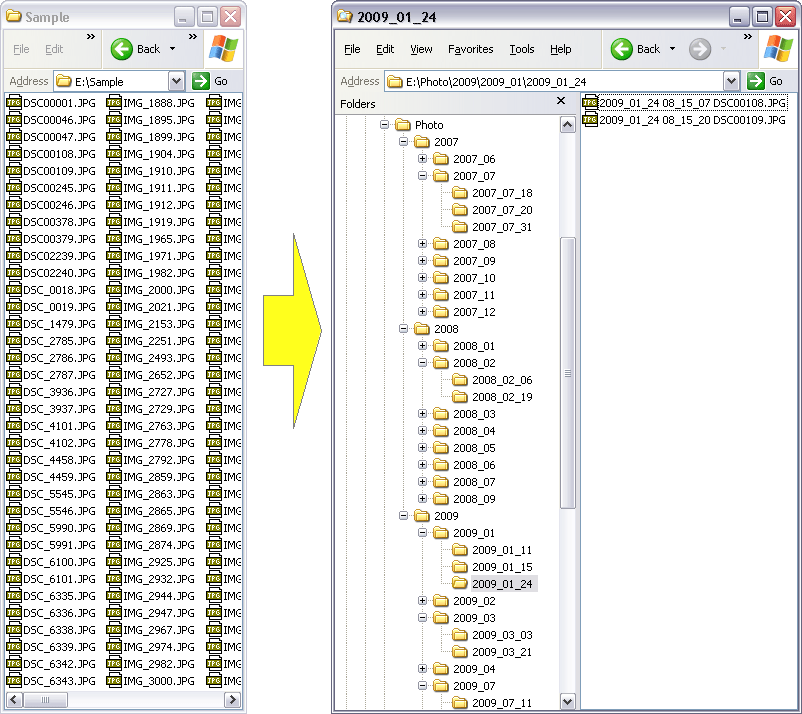
Auto Photo Organizer organizes digital
photos automatically. The software could create year, month, and day folders by
date taken and then copy or move photos to corresponding folder automatically.
Besides date taken, the photo organizer software could organize photos
by date modified, date created, and date accessed. The software
could organize JPG file taken by major digital cameras. And, Auto
Photo Organizer also could organize raw image files taken by Canon
(.crw, .cr2), Nikon (.nef, .nrw), Sony (.arw, .srf, .sr2), Pentax
(.pef), Olympus (.orf), Kodak (.dcr, .k25, .kdc), Panasonic
(.raw, .rw2), Fujifilm (.raf), Samsung (.srw), Leica (.raw,
rwl, .dng), Sigma (.x3f), Minolta (.mrw), and so on. You could view
detailed meta/EXIF information of photo file with the software.
Auto Photo Organizer could rename photo files
by date taken, date modified, date created, and date accessed.
The organizer software could organize files by file
extension. It creates folder by file extension, and then copies or moves files
to corresponding folder automatically.
Besides photos, Auto Photo Organizer could organize
any file by date modified, date created, date accessed, and extension.
You could organize movies, videos, music,
and other files with the organizer software.
Auto Photo Organizer supports batch organization
and is full compatible with Windows 10/8/7/Vista/XP/2000 (both 32-bit and 64-bit editions).
 Free Download Auto Photo Organizer
Auto Photo Organizer is 100% clean and safe to install.
It's certified by major download sites.

| Organize
Photos in 3 Easy Steps |
|
Step #1: Choose Photos
Click "Add Files" or "Add Folder" to choose
photo files.
Step #2: Set Organization Options
Choose organization type: By Date Picture Taken, By Date Modified,
By Date Created, By Date Accessed, or By File Extension.
Set the program to create year, month, and day folders, and rename filename of
target file.
Set output folder.
Step #3: Organize Photos
Click on "Move Files" or "Copy Files" to organize
photos.
|
Top 7 Benefits of Auto Photo Organizer:
- Organize photos in minutes
If you have a digital camera, you may have a bulk of digital photos in a folder,
or separated folder, for example, 100CANAN, 101CANAN, which don't make any senses.
It will take hours to organize the photos manually. The Auto Photo Organizer
is an ideal software to organize the photos. The software organizes photos by
date picture taken automatically.
- Organize raw images
The most photographers prefer raw image file to JPG file. As they could edit
the raw image file with professional photo software. The Auto Photo Oraganizer
supports raw image files taken by the most digital cameras.
- Create year, month, and day folders automatically
Auto Photo Organizer creates year, month, and day folders,
and moves or copies photos to corresponding folder automatically. You could also
customize folder name.
- Rename photo files by date
The Photo Organizer software could rename file name of photo
and other files by date. Thus you could easily see when the photo was taken from
file name.
- Organize files by extension
Auto Photo Organizer is able to organize files by extension.
It creates folder by extension, and moves or copies photos to corresponding folder
automatically.
- Batch organization
Auto Photo Organizer supports batch organization.
You could add bulk of photos or other files; or choose a folder and add all files
within it; and then organize all files in list at a time.
- No experience of photo file and digital camera necessary
Auto Photo Organizer is very easy-to-use without
knowledge of photo file and digital camera.
Auto Photo Organizer Key Features:
|
Since photography is increasingly proving to be booming business nowadays,
especially since the advent of digital photography; things have become much easy
and flexible. Unlike the conventional film based cameras, the digital cameras
make it possible to easily store large number of images on the computer system
and organize them effectively. Being a professional photographer or even a web
designer, a suitable collection of imagery is always there on your system drives.
Arranging these collections easily and simply is not a difficult task; however
it requires considerable amount of effort and time which is absolutely unnecessary;
especially when you have Auto Photo Organizer 2.2.548 offering enhanced
assistance in organization images chronologically; and even as per the modifications
performed.
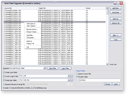
Auto Photo Organizer 2.2.548 opens with a neatly organized interface
with the chief options placed at the right panel and bottom pane. Further, the
main screen displays the image files by the source and the facility to add more
files into the list. The working of the application is immensely simple; the user
simply needs to choose the images that require organization and click on open
or simply click on "add folder" and the software would add the files
into the said folder. The application creates the folder by years and months and
even by the date of picture taken and the user can easily move the images correspondingly
with the help of this facility. Furthermore, the application is compatible with
major digital cameras like Nikon, Cannon, Sony, Kodak and Samsung etc. Also, it
can rename the photo files by the date of the picture taken and date of modification
and date accessed.
To conclude, Auto Photo Organizer 2.2.548 earns superlative rankings
for its constructive and practical usage; however the common premise and immense
competition gives it a rating score of 3.5 points.
-- Reviewed
by freedownloadscenter.com editor
|
Auto Photo Organizer Quick Info:
- Version: 2.4 build 745
- Size: 3.35 MB
- License: Free to try
- Platforms: Windows 10 / 8 / 7 / Vista / 2008 / XP / 2003 / 2000 (both 32-bit
and 64-bit editions compatible)
Free Download Auto Photo Organizer
Auto Photo Organizer Related Topics:
Auto Photo Organizer Version History:
- Auto Photo Organizer v2.4 build 745
- Supports Adobe raw image file (*.dng)
- Supports Canon raw image file (*.cr2;*.crw)
- Supports Epson raw image file (*.erf)
- Supports Fujifilm raw image file (*.raf)
- Supports Hasselblad raw image file (*.3fr)
- Supports Kodak raw image file (*.dcr;*.k25;*.kdc)
- Supports Leaf raw image file (*.mos)
- Supports Leica raw image file (*.raw;*.rwl;*.dng)
- Supports Mamiya raw image file (*.mef)
- Supports Minolta raw image file (*.mrw)
- Supports Nikon raw image file (*.nef;*.nrw)
- Supports Olympus raw image file (*.orf)
- Supports Panasonic raw image file (*.raw;*.rw2)
- Supports Pentax raw image file (*.pef)
- Supports Phase_One raw image file (*.iiq;*.eip)
- Supports Rawzor raw image file (*.rwz)
- Supports Samsung raw image file (*.srw)
- Supports Sigma raw image file (*.x3f)
- Supports Sony raw image file (*.arw;*.srf;*.sr2)
- Views detailed meta/EXIF information of photo file
- Adds option "When target file exists", the program rename file automatically,
overwrite, or skip
- Fixes bugs
- Auto Photo Organizer v2.3 build 617
- Adds abbreviated month name (Jan, Feb, Mar, Apr, May, Jun, Jul, Aug, Sep,
Oct, Nov, and Dec)
- Adds full month name (January, February, March, April, May, June, July, August,
September, October, November, and December)
- Adds hour in 12-hour format
- Adds AM or PM
- Fixes bugs
- Auto Photo Organizer v2.2 build 569
- Resizes main window of Auto Photo Organizer
- Fixes bugs
- Auto Photo Organizer v2.2 build 548
- Adds file extensions filter for "Add Folder" and Drag/Drop
- Adds option for saving organization operations to a log file
- Fixes bugs
- Auto Photo Organizer v2.1 build 536
- Adds organization option "By Date Picture Taken, if not available, By Date
Modified"
- Adds organization option "By Date Picture Taken, if not available, By Date
Created"
- Adds organization option "By Date Picture Taken, if not available, By Date
Accessed"
- Adds options "Add sequence number at end of filename if target file exists"
- Fixes bugs
- Auto Photo Organizer v2.0 build 519
- Adds options to create year, month, day folders
- Supports to rename filename of target file
- Organize files by extension
- Outputs files to a specific folder
- Fixes bugs
|